
Done On Command Review

Done On Command is an AI business platform built around a simple but ambitious idea: instead of generating another draft for you to finish, it should help complete and deliver the work.
The platform combines page building, video creation, image generation, lead magnets, email campaigns, social scheduling, and a website chatbot inside one command center. More importantly, each business receives a persistent memory that stores its branding, voice, offers, and other details.
That sounds attractive, especially for freelancers and agencies tired of moving between several disconnected tools. But broad feature lists can be misleading. The real questions are whether the platform solves a genuine workflow problem, whether the entry plan is usable, and which limitations buyers should understand before paying.
This Done On Command review examines the product from that practical angle.
Done On Command Review Summary
| Review category | Assessment |
|---|---|
| Best feature | Persistent memory shared across multiple business departments |
| Starting price | $47 one-time during the launch offer |
| Businesses on front end | Up to 2 |
| Main tools | Pages, Video, Images, Leads, Email, Social, and Front Desk |
| Control options | Web dashboard and Telegram |
| Commercial use | Included with the front end |
| Main limitation | Monthly generation caps and a watermark on front-end pages |
| Guarantee | 14 days |
| Best suited to | Freelancers, agencies, affiliate marketers, and solo operators |
| Overall view | Promising concept with practical features, but output quality and reliability still require real-world testing |
Quick Verdict
Done On Command appears most useful for people who regularly produce marketing assets for one or more businesses and want to reduce tool switching.
Its persistent-memory system, approval controls, separate business dashboards, and ability to move beyond drafting are meaningful advantages. The $47 front end is also functional rather than being only a stripped-down trial.
However, this is not a completely hands-off business machine. Users must review the work, third-party accounts may still be required, and the front-end generation limits could feel restrictive for active agencies.
CommandAIHub.com is an independent affiliate information website and is not the official Done On Command website. We may receive a commission if you purchase through one of our links, at no additional cost to you.
What Is Done On Command?
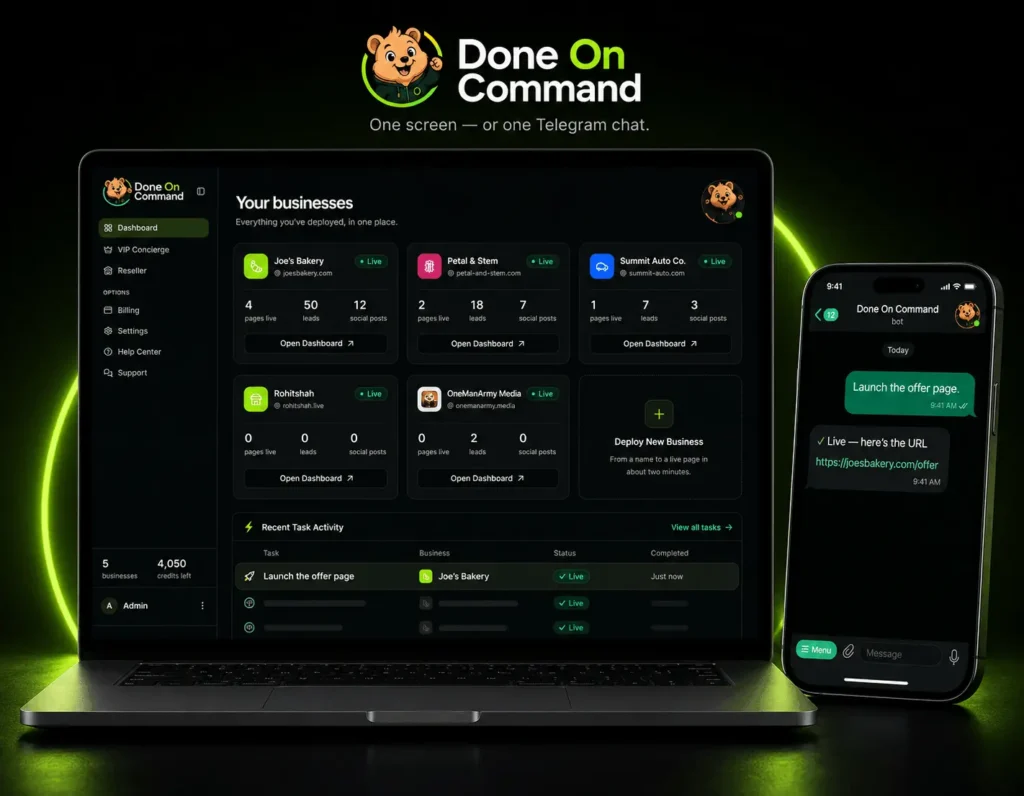
Done On Command is a persistent-memory AI business operator.
A user adds a business domain, and the platform creates a memory using available information such as:
- Logo
- Brand colors
- Fonts
- Writing voice
- Products
- Services
- Offers
- General business details
That memory is then shared across seven business departments:
- Pages
- Video
- Images
- Lead Magnets
- Social
- Front Desk
The important distinction is that Done On Command is intended to deliver completed assets.
A page can be built, hosted, and published. A video can be rendered with a voiceover and captions. An approved email can be sent through the user’s autoresponder. Social posts can be scheduled through supported publishing integrations.
In simple terms, it tries to bridge the gap between asking AI for an idea and getting the finished work out into the world.
How Done On Command Works in Practice
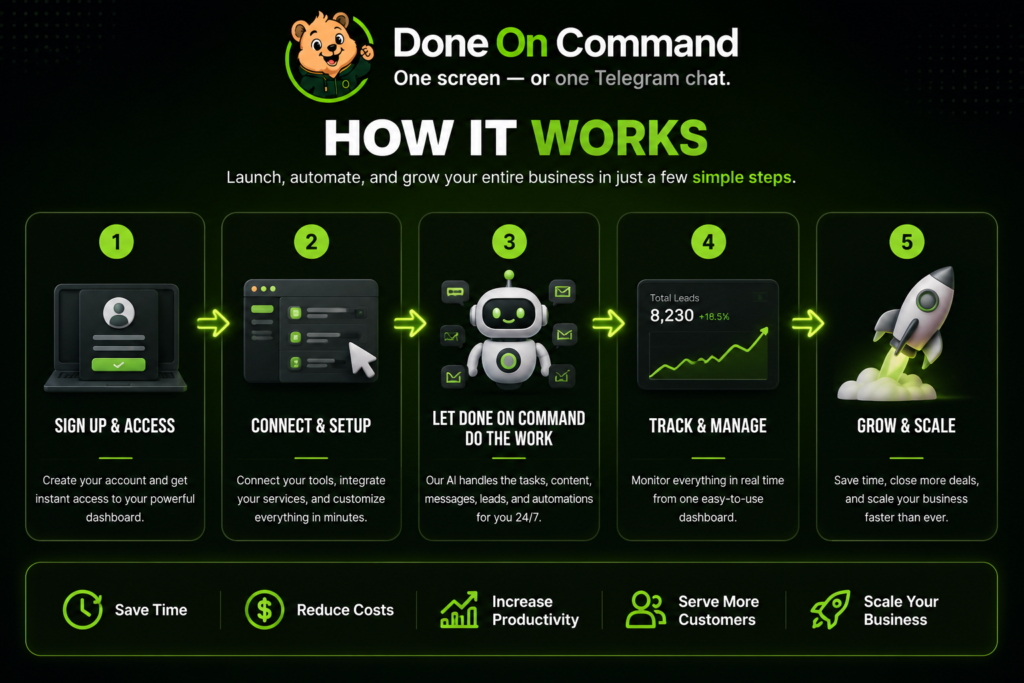
The basic workflow has five stages.
1. Create a business profile
The user enters a business domain. Done On Command examines the available site information and creates a persistent business memory.
Each business receives a separate memory and dashboard.
2. Connect external accounts
Users can connect supported autoresponders, social-publishing services, and an optional personal AI key.
The listed email integrations are GetResponse, GoHighLevel, Brevo, and Mailchimp. Social publishing works through Upload-Post and Buffer.
3. Enter a command
The user describes the desired task through the web dashboard or Telegram.
For example:
- “Build a landing page for this offer.”
- “Create a short promotional video.”
- “Prepare next week’s email campaign.”
- “Schedule a month of social posts.”
4. Review and revise
Completed work remains behind an approval gate.
The user can inspect the asset, request revisions through chat, and approve it when ready.
5. Deliver the asset
After approval, the relevant page, video, campaign, post, or chatbot can be delivered through the platform and its connected services.
That approval step deserves attention. Done On Command automates production, but it intentionally does not remove human responsibility.
What Stands Out in This Done On Command AI Review?
Persistent memory solves a real problem
This is the product’s strongest idea.
Most business owners do not struggle because AI cannot write a headline. They struggle because every tool starts with incomplete context.
The page builder does not know what the email tool created. The image generator may use different colors. The social scheduler does not understand the offer unless someone explains it again.
Done On Command gives each business a shared memory that can support multiple departments. The official presentation also states that the memory is intended to update as the business changes.
If that works consistently, it could save a meaningful amount of repetitive setup.
It focuses on execution rather than drafts
Many AI products generate text and stop.
Done On Command is designed to take the next steps by hosting pages, rendering videos, scheduling posts, and sending approved campaigns through connected accounts.
That does not mean every task becomes effortless. It does mean the platform is aimed at a more valuable part of the workflow: turning an idea into something usable.
Every business receives a separate workspace
Separate business memories and white-label dashboards make the platform more relevant to agencies.
A freelancer working with a restaurant, a coach, and an e-commerce store can keep each brand’s assets and instructions apart. The front end supports two businesses, Pro supports five, and Agency Platinum supports ten.
Approval remains with the user
Nothing outbound should go live without approval.
This is a strength, not an inconvenience. An inaccurate price or broken link in an email can cause more damage than a slow workflow.
Done On Command can handle production, but the user keeps control over what is published, sent, or scheduled.
Commercial rights begin on the entry plan
The $47 front end includes a commercial license.
Users can sell completed pages, videos, campaigns, lead magnets, and related services to clients. Reselling access to the software itself is different and requires Reseller Pro.
That distinction makes the entry plan more useful for freelancers who want to sell deliverables rather than software accounts.
The Features That Matter Most
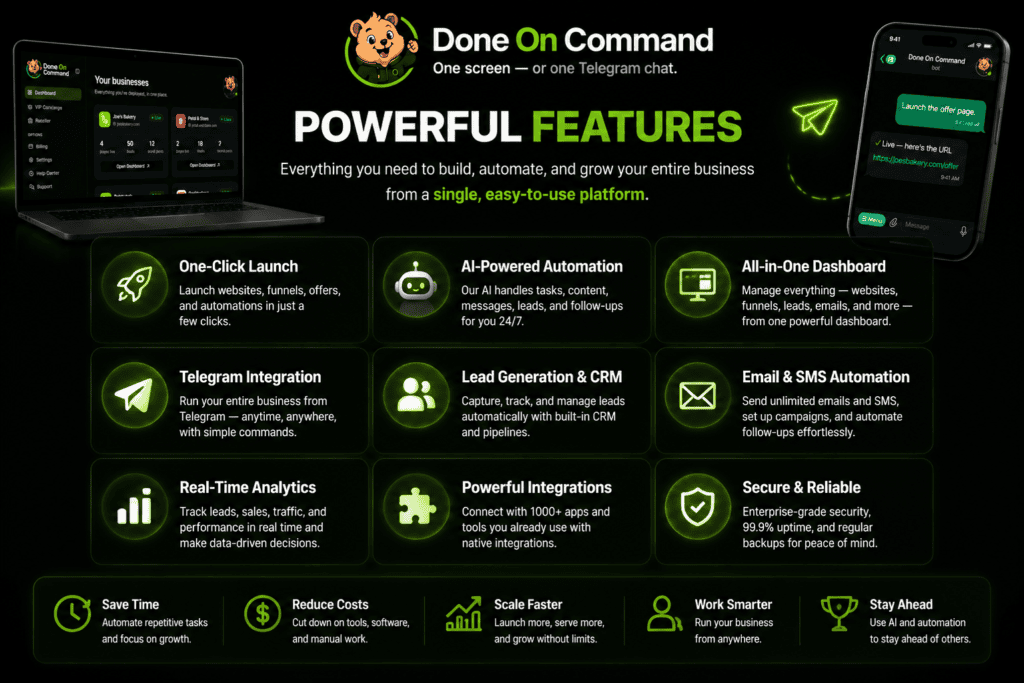
Done On Command has a long feature list, but these are the capabilities most likely to affect the buying decision.
| Capability | Practical use |
| Persistent business memory | Reduces repeated branding and offer instructions |
| Page creation | Produces hosted landing pages and multi-page websites |
| Screenshot-based page building | Uses an uploaded design as visual direction |
| Video generation | Creates promotional videos with voiceovers and captions |
| Spokesperson Studio | Creates presenter-style videos from a photo or uploaded clip |
| Lead magnets | Produces quizzes, calculators, forms, and interactive tools |
| Email campaigns | Drafts and sends approved campaigns through supported autoresponders |
| Social scheduling | Prepares and schedules content through supported integrations |
| Front Desk chatbot | Answers website questions using business information |
| Telegram control | Allows commands and approvals from a mobile conversation |
| Asset library | Stores generated and uploaded files for each business |
The platform is broad enough to replace parts of several separate workflows. It will not necessarily replace every specialist tool.
A dedicated video editor may provide deeper manual controls. A mature page builder may offer more detailed design customization. An advanced email platform will still manage contacts, deliverability, and automation rules.
Done On Command’s value is in coordination and convenience rather than being the most advanced standalone tool in every category.
Done On Command Pros and Cons
Pros
- Shared persistent memory across several marketing channels
- Separate profiles and dashboards for different businesses
- Pages, videos, images, email, social, leads, and chatbot tools in one platform
- Commands available through the web and Telegram
- Approval required before outbound work goes live
- Commercial license included with the front end
- Hosted page delivery
- Optional personal AI key
- Failed or declined actions should not consume platform credits
- Entry plan includes all seven departments
Cons
- Front-end page, image, and video generation is limited
- Pages generated on the entry plan carry a DOC watermark
- Front-end hosting is included for only one year
- Email and social delivery depend on external services
- Third-party subscriptions may add to the total cost
- Users must still check every output carefully
- High-volume agencies may need paid upgrades
- Long-term platform reliability and output consistency have not yet been independently established
- “Unlimited” Mega Bundle usage remains subject to technical and fair-use conditions
Important Limitations to Understand
The $47 plan is not unlimited
The front end includes:
- Two businesses
- 1,000 monthly credits
- Five new videos per month
- Five video edits per month
- Ten pages per month
- Ten images per month
- Video output up to 720p
- One year of hosting
- Up to 1 GB of storage
It also places a Done On Command watermark on generated pages.
For one or two brands, those allowances may be reasonable. For an agency promising weekly pages, videos, and images to several clients, they may disappear quickly.
It still relies on external platforms
Done On Command can prepare and manage email campaigns, but the emails are sent through a supported autoresponder.
Social publishing also relies on Upload-Post or Buffer.
Those accounts may involve additional costs, limitations, and configuration. An “all-in-one” command center does not mean every external service disappears.
Approval means it is not fully hands-off
The platform is not intended to run the entire business without supervision.
Every important output should be checked for:
- Accuracy
- Prices
- Dates
- Links
- Brand consistency
- Legal claims
- Contact details
- Visual errors
The review process protects the business, but it also means the user remains involved.
Generated quality may vary
The persistent memory may improve relevance, but it cannot guarantee that every page, image, script, or video will be ready on the first attempt.
AI-generated visuals can contain errors. Marketing copy can miss nuance. A screenshot-inspired page may still need refinement.
The ability to request changes through chat is useful, but buyers should expect an iterative process rather than perfection from every first command.
Independent long-term evidence is limited
The launch is scheduled for August 4, 2026, with the launch cart closing on August 9. That means broad independent data about reliability, support quality, and performance under long-term use is not yet available.
This does not mean the product will not work. It means buyers should separate the demonstrated capabilities from results that have not yet been widely verified.
Done On Command Pricing and OTOs
Done On Command Commercial costs $47 one-time during the launch offer.
| Offer | Price | Main addition |
| Done On Command Commercial | $47 | Core platform for two businesses |
| Pro | $67 | Five businesses, 4K video, and doubled generation limits |
| VIP Concierge | $67 | Three done-for-you setups, live training, and direct support |
| Agency Platinum | $97 | Ten businesses, 5,000 credits, and page-watermark removal |
| Reseller Pro | $197 | Twenty-five software accounts to sell |
The official sales page says the front end is complete on its own and that all four upgrades are optional.
Everything Bundle
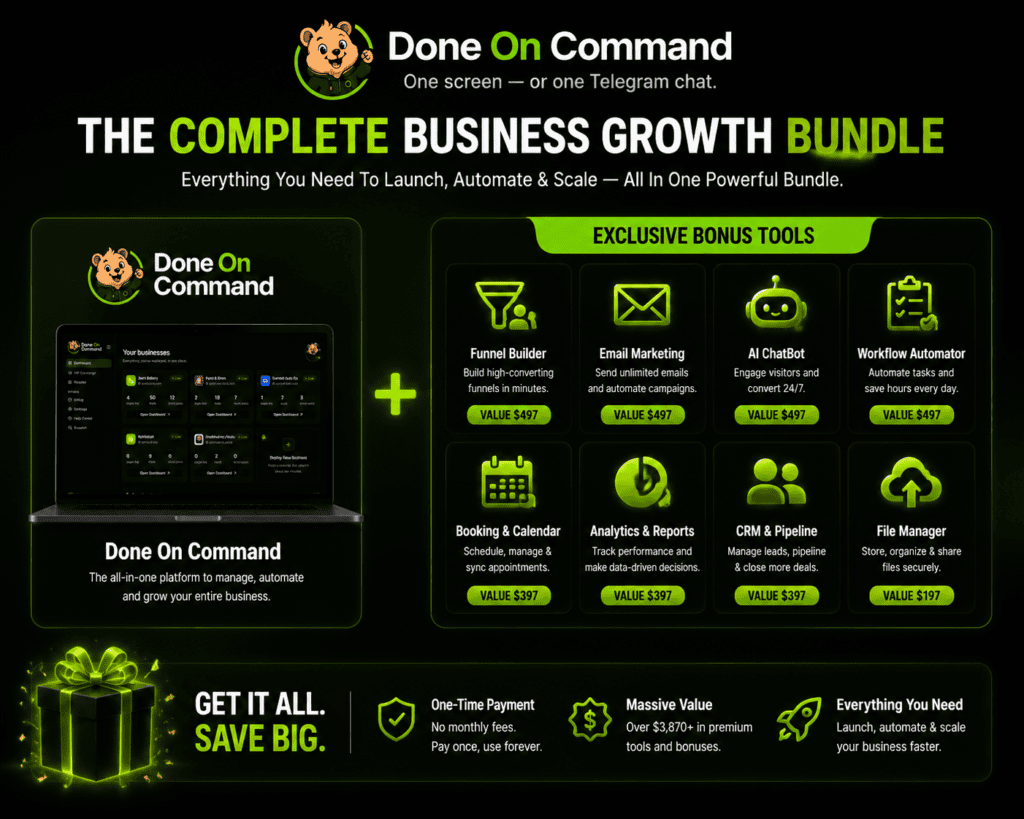
The Everything Bundle combines the Done On Command front-end version with all four optional upgrades, giving users access to the complete package in one purchase.
The upgrades are valued at $475 when purchased separately. The Everything Bundle is available for a one-time payment of $287 with the DOCBundle coupon, which provides a $60 discount from the regular $347 bundle price.
What’s Included:
- Done On Command Front-End Access
- Done On Command Pro
- Done On Command VIP Concierge
- Done On Command Agency Platinum
- Done On Command Reseller Pro
Pricing, discounts, and availability may change over time. Always confirm the final price shown on the live checkout page before completing your purchase.
Mega Bundle
The separate Mega Bundle add-on costs $247 and requires the Everything Bundle.
It adds unlimited business profiles, 10,000 monthly credits, unlimited page, image, and video generation, unlimited years of hosting, and another 1 GB of persistent storage, based on the supplied funnel documentation.
This option is aimed at higher-volume users rather than beginners.
Who Is Done On Command Best For?
Freelancers expanding their services
A specialist could offer a broader package without manually operating several disconnected tools.
For example, a copywriter might add landing pages, promotional graphics, email campaigns, and short videos to a client proposal.
Agencies managing multiple brands
Separate business memories and white-label dashboards make the strongest case for agency use.
Agency Platinum becomes more relevant when client count, credits, and watermark removal matter.
Affiliate marketers
An affiliate marketer could use one workspace to produce campaign pages, lead magnets, images, emails, videos, and social content.
The front-end limits should be considered if several promotions will be active at the same time.
Coaches and course creators
The combination of lead magnets, landing pages, email, and social tools could support a new offer without requiring a separate production workflow for each asset.
Solo business owners
A solo operator may benefit from reducing repetitive tasks and keeping brand information in one place.
Who Should Probably Skip It?
Done On Command may not be a good fit if:
- You need advanced manual control over every design and video edit
- You already have a connected workflow that works well
- You do not plan to create or sell marketing assets
- You expect the software to generate customers automatically
- You are unwilling to review AI-generated content
- You need an enterprise platform with large teams, SSO, or complex permissions
- The front-end limits are too low, but you do not want to purchase upgrades
- You tend to buy tools without implementing them
Here’s the honest point: software cannot fix a missing offer, weak positioning, or lack of traffic.
Done On Command may help produce and deliver the work. It does not remove the need to decide what should be created, who it is for, and how it will reach the right audience.
Is Done On Command Worth It?
At $47, the front end appears reasonably positioned for someone who will actively use several departments.
The product becomes less attractive when evaluated as only a page builder or only a video generator. There are many specialist tools in those categories.
Its value comes from the combination of:
- Persistent business memory
- Multiple connected departments
- Delivery functions
- White-label workspaces
- Approval controls
- Commercial use
For one or two businesses with moderate production needs, the entry plan may be the sensible place to start.
Pro may be worthwhile when five business profiles, 4K output, or doubled generation limits are genuinely needed. Agency Platinum is the more relevant upgrade for client work because it expands the account to ten businesses and removes the page watermark.
The complete bundle makes sense only when several upgrades would otherwise be purchased separately.
Final Verdict
Done On Command addresses a real weakness in the current AI-tool market: plenty of applications can think and draft, but the user is still responsible for connecting the tools and delivering the final work.
Persistent business memory is the most compelling part of the product. If it reliably keeps pages, videos, images, campaigns, and social content aligned with each business, it could reduce significant repetitive work.
The approval gate, commercial license, separate business dashboards, and delivery features also make the platform more practical than a simple content generator.
The concerns are equally clear.
The front-end plan has firm monthly limits, generated pages carry a watermark, external platforms may still be needed, and every output requires human review. Since the product is entering its launch period, long-term reliability and support quality have not yet been broadly established.
Our overall assessment is cautiously positive.
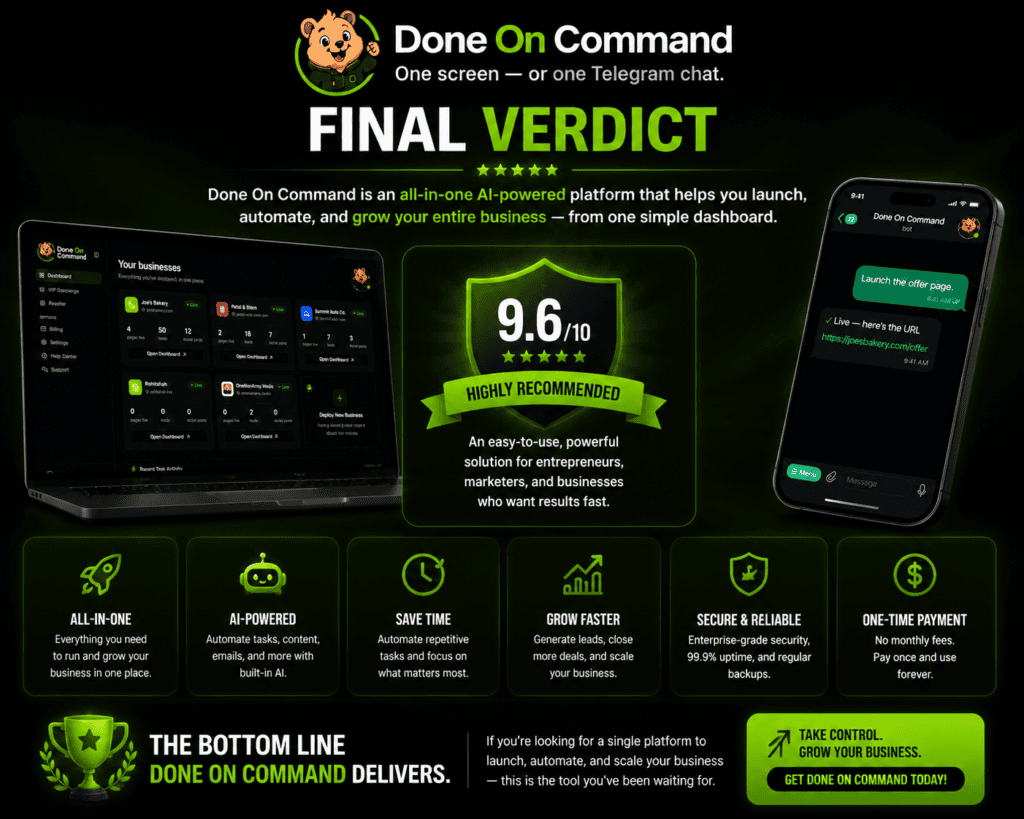
Done On Command looks most promising for freelancers, affiliate marketers, and small agencies that understand their workflow and will use multiple departments. It is less compelling for buyers searching for a magical, completely autonomous business system.
The best approach is to evaluate the front-end limits against your actual monthly workload and avoid buying upgrades that solve problems you do not yet have.
Frequently Asked Questions
Is Done On Command legitimate?
Done On Command appears to be a legitimate software product with an official website, clearly outlined features, published pricing details, upgrade options, and a structured purchasing process.
However, since it is a newly launched platform, long-term independent user feedback and extended real-world usage reviews may still be limited. Potential buyers should review the available information, explore the features, and make sure the platform matches their specific business needs before purchasing.
How much does Done On Command cost?
The front-end Commercial plan is listed at $47 one-time during the launch offer. Optional upgrades cost $67, $67, $97, and $197.
Does Done On Command have a monthly fee?
The launch front end and upgrades are presented as one-time payments. The official preview says the one-time launch pricing ends when the cart closes and the product is expected to move to monthly pricing afterward. Connected third-party services may also have recurring fees.
Are the OTOs required?
No. The front end includes all seven departments and is described as complete on its own. The upgrades increase capacity, provide setup assistance, add agency features, or provide reseller rights.
Can Done On Command be used for clients?
Yes. A commercial license is included with the front end. Users can sell completed pages, videos, campaigns, lead magnets, and other deliverables.
Does it include a money-back guarantee?
Yes. The official offer includes a 14-day money-back guarantee. Buyers should review the current refund instructions on the live sales and checkout pages.
Does Done On Command guarantee income?
No. Software features and commercial rights do not guarantee clients, traffic, sales, revenue, or profit.
Ready To Put AI To Work For Your Business?
Done On Command brings websites, content creation, automation, marketing assets, and business management tools together in one powerful platform.
Instead of managing multiple tools and complicated workflows, you can use a single system designed to help you create, automate, and scale faster.
Whether you are building your own business, managing client projects, or looking for a smarter way to handle daily tasks, Done On Command gives you the tools to move from ideas to execution.
Explore what Done On Command can do and see if it fits your goals.